Active@ Disk Image

Hard Drive Backup Software

Downloads | Products | Support | Partners | Contacts  
Active@ Disk Image


Active@ Disk Image Support Center
Users Guide

Active@ Disk Image Screenshots

Active@ Boot Disk Lite (Bootable Rescue Media)

Active@ Boot Disk Lite

click on the picture to enlarge

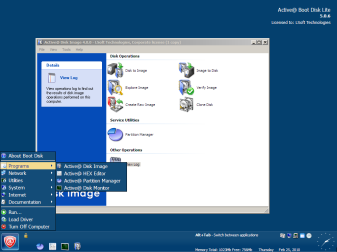
The Bootable Rescue Media screen shows the components of Active@ Disk Image used to start an unbootable system to restore a disk image.
Boot Disk Creator

Active@ Boot Disk Lite Menu

click on the picture to enlarge

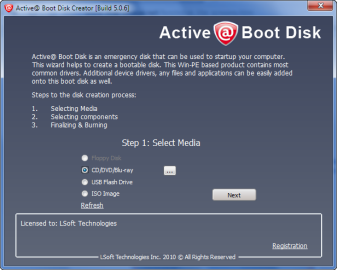
Active@ Boot Disk Creator component allows to create a USB Flash, DVD/CD bootable disk.

CD Boot Disk Creation in Progress

CD/DVD Boot Disk Creator

click on the picture to enlarge

Boot Disk Creator is writing a bootable CD.

Note: Change BIOS settings to boot from CD/DVD. You must then enter the BIOS settings and change the boot order sequence to boot from CD/DVD before the hard disk.

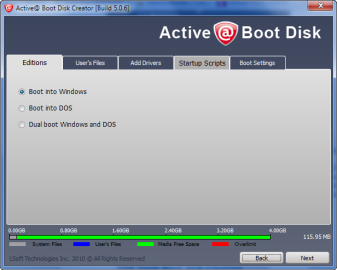
Active@ Boot Disk Options

Active@ Boot Disk Options

click on the picture to enlarge

Boot Disk Creator allows to customize a boot disk by selecting Boot Disk Edition, adding user's files and third-party drivers to the disk or ISO image.

You may also add startup scripts allowing further customization of Boot Disk environment and select other options like additional language support or time zone.

The meter in the bottom of the screen shows space allocation details.


Active@ Disk Image
Active@ Products

Active@ Boot Disk
is a bootable Live CD/DVD for system recovery purposes.
Active@ File Recovery
recovers data after formatting or loss of partitions.
Active@ KillDisk
is a disk eraser software for secure formatting of hard drives. DoD 5220.22-M compatible.
Active@ Password Changer
is a DOS-based solution for resetting local user passwords.
Active@ Partition Recovery helps to recover deleted partitions and logical disks on hard drives.


Send Feedback | Report an Error

Active@ Data Recovery Software 2010

Download Buy Play Video Learn more