Main Program Window
To open the main program window, in the main Windows menu select Programs/Active@ Disk Image/ Active@ Disk Image.
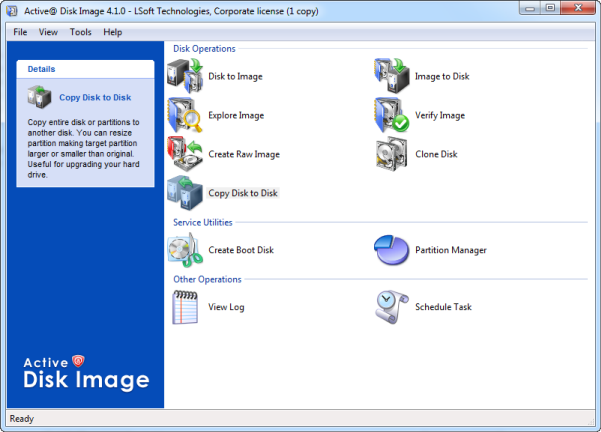
The main program window contains a command menu bar, a panel that displays operations and a status bar.
The Tools menu contains a list of the Active@ Disk Image operations. When you hover the mouse pointer over a command, a description of the command appears in the status bar.
In the display panel, when you click one of the operations to select it, a description of the selected operation appears in a description panel, to the left.
Operations in the display panel use wizards to step you through the procedures. The five Backup Operations are functions that you may perform with disk images. The Disk-to-Disk Operation copies data from one disk or partition directly to another disk or partition without making a disk image archive. The Other Operations provide additional services such as viewing an application log and automating the tasks.
To open a wizard dialog, double-click an operation in the display panel or select an operation from the Tools menu.
List of menu commands
File
- View Log — Opens the View Log dialog box. You may view descriptions of all activities, including warning and error messages.
- Schedule Task — Opens the Scheduling dialog box. You may automate creating disk images by making and scheduling a task.
- Settings — Opens the Program Settings dialog box. You may configure the settings for data compression, image splitting and what type of data is recorded in the log file.
- Save Hardware Info — Saves information about all hard drives and partitions installed in the computer into an XML file.
- Create Boot Disk — Creates a bootable USB flash or CD/DVD disk.
- Partition Manager — Launches Partition Manager utility.
- Exit — Closes the program.
View
- Status Bar — Toggles the status bar display on or off.
- Refresh Devices — Rescans all disks attached to the system. This command might be useful when disk configuration has changed since the application started.
Tools
- Disk to Image — Opens the Disk to Image Wizard. Helps you to create a Backup Disk Image of an entire disk(s) or of selected partitions in the system.
- Image to Disk — Opens the Image to Disk Wizard. Helps you to restore data from a disk image archive.
- Explore Image — Opens Active@ Disk Image Explorer. Helps you to browse through folders and files in a disk image as though it was a hard drive. You may select folders or individual files and restore them.
- Verify Image — Opens the Verify Image Wizard. Helps you check the integrity of a disk image archive file.
- Create Raw Image — Opens the Create Raw Image Wizard. Helps you create a raw type disk image of only one partition or the entire disk.
- Clone Disk — Opens the Clone Disk Wizard. Helps you to transfer a sector-by- sector copy from one disk (partition) to another.
Help
- Help Contents — Opens the user guide.
- Check for Updates — checks if any updates are available to download.
- Send Feedback via Web — opens a web form in a browser, allowing you to leave comments and suggestions regarding your experience with Disk Image.
- Send Feedback via E-mail — allows you to send your feedback as E-mail by launching your default e-mail program.
- Register Product — allows you to register the program if it is not done yet.
- About Active@ Disk Image — Displays information about the program version, licensing and copyright statements.
About the status bar
The status bar is at the bottom of the main program window. Here you may view the current status of the application or information about operation commands. When Active@ Disk Image is idle and ready to perform an operation, the status displays "Ready".
To toggle the status bar on and off, from the View menu, click Status Bar.
When you run Active@ Disk Image, the application gathers information about disks and partitions available to the system. During this preliminary operation, the status bar displays "Initializing. . . " and prevents most other operations from starting. If you try to open a wizard before this initializing is finished, Active@ Disk Image shows a message box with the status bar message in it. After initializing is finished, this message box closes automatically and the selected operation is started.

