Active@ Disk Image

Hard Drive Backup Software

Downloads | Products | Support | Partners | Contacts  
Active@ Disk Image


Active@ Disk Image Support Center
Users Guide


Selecting a Destination Disk

After you have selected a source disk to clone, you must select a destination disk.

In the Selecting a Destination Disk page, select a target disk to receive cloned data from the selected disk. The disk that you select must be big enough to hold all the data in the source disk. If you select a disk that is too small, the Next button is disabled. 
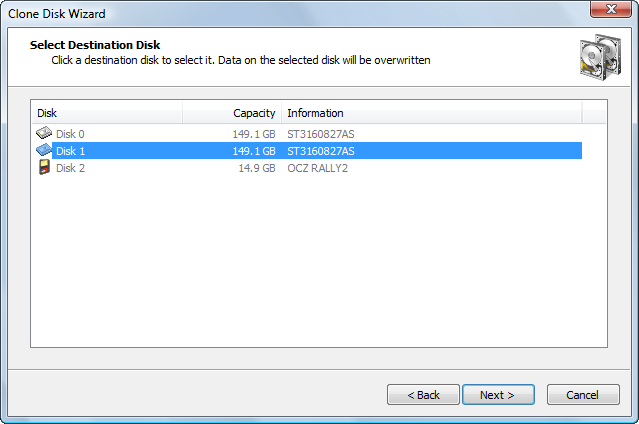
After you click Next, an attempt is made to lock the target disk for exclusive access. If the target disk is being used by another application or by the operating system, an error dialog box appears.
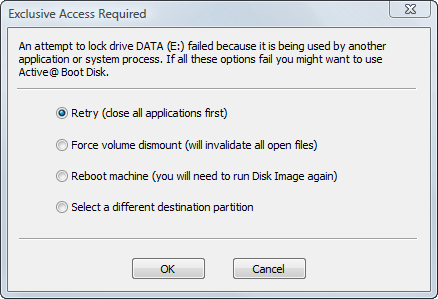
Select one of the solutions and click OK to continue.

See Also

Cloning a Whole Disk

Clone Disk Wizard


Previous Contents Next
Active@ Disk Image
Active@ Products

Active@ Boot Disk
is a bootable Live CD/DVD for system recovery purposes.
Active@ File Recovery
recovers data after formatting or loss of partitions.
Active@ KillDisk
is a disk eraser software for secure formatting of hard drives. DoD 5220.22-M compatible.
Active@ Password Changer
is a DOS-based solution for resetting local user passwords.
Active@ Partition Recovery helps to recover deleted partitions and logical disks on hard drives.


Send Feedback | Report an Error

Active@ Data Recovery Software 2008

DownloadBuyLearn more