Choose how the cloned partition will be used in the system. The cloned partition may be Active, Primary or Logical.
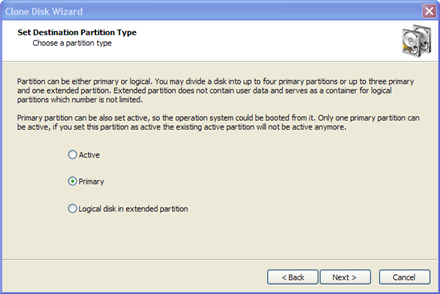
Active — A hard disk can have only one active partition. As an Active partition, it is automatically set as Primary as well. If the selected partition is a bootable partition, you must choose Active in order to allow the system to boot from it. If the target disk already has a system residing in an active partition, when you clone a partition onto a new active partition you will replace the existing active partition. All data on the formerly active partition will remain intact, but you will not be able to boot from it anymore.
Primary — A hard disk can have up to four primary partitions.
Logical — A hard disk can have an unlimited number of logical partitions. (the number of primary partitions is limited to three in this case).
Single partition without MBR — This option is available for USB flash drives only. Normally USB flash disks do not have an MBR and their single partition is placed starting from sector 0. Nevertheless it is possible to create a flash drive with an MBR. It might be the preferred option when drive must be made bootable.
If the image you're restoring contains only data, it does not matter what type of partition you choose.
Only one partition on a disk can be set to active (the bootable partition). Choose Active type only when you are cloning a system partition and you want to boot from it. If you are cloning a system partition only to retrieve the data from it, choose Primary or Logical.
Your type choices on this page depend on what kind of partition you have chosen to clone:

