When you are restoring a disk image, you may restore an entire disk, or a partition. In either case, you must first select the disk archive.
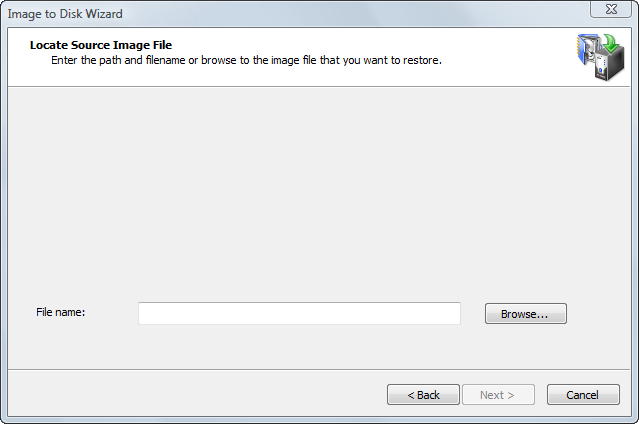
To identify a disk image file, type the file name into the File name field.
To open the Open File dialog box and view information about a number of archive files, click Browse. . . The Open File dialog box displays all supported image file types (with file extensions .ADI, .DIM and .ISO).
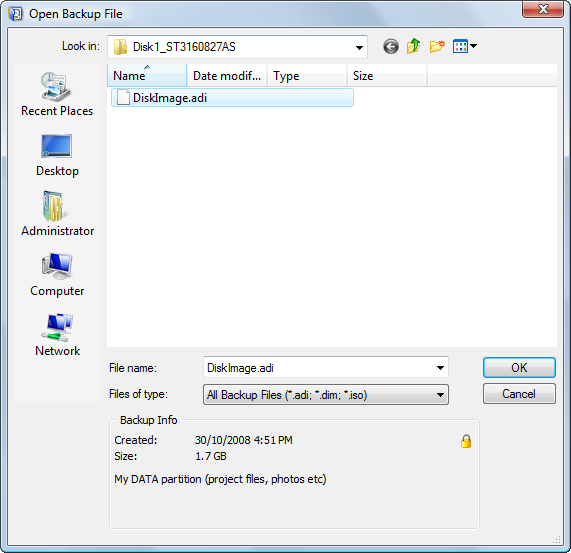
Click a file in the list to select it. In the Backup Info area of the Open File dialog box, you can view the archive date, file size and description of the file. If the selected image is password protected, a small lock icon appears in the top-right corner of the Backup Info area.
Click OK to return to the Backup Selection wizard screen. The selected image name appears in the File name field.
Click Next to continue.
When a disk image is split into several files, the image description is placed into the last file of archive. If all files are located in the same folder, you can select any file of the image.
The application will automatically locate the last file of archive and read backup information. If the last file cannot be found, the message in the Backup Info area indicates that The file is not the last file of multi-file archive. . . .
Locate the last archive file and select it to open the image.
You don't need to have all files in one place in order to start restoring the image. As each archive file location is required, the application requests a path to the file.
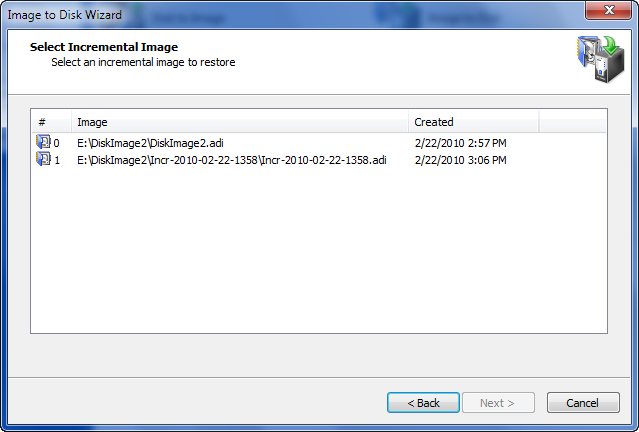
If the image you have opened is part of an incremental backup, Active@ Disk Image looks for all incremental images in a series and shows them in the wizard. You have to select which incremental image (meaning which version of backup) to open.