After you have selected an archive, a list of partitions stored in the backup archive appears. Select the check box next to the disk or the partition that you want to restore. At the bottom of the list, a description of the selected image appears (if a description has been stored with the image).
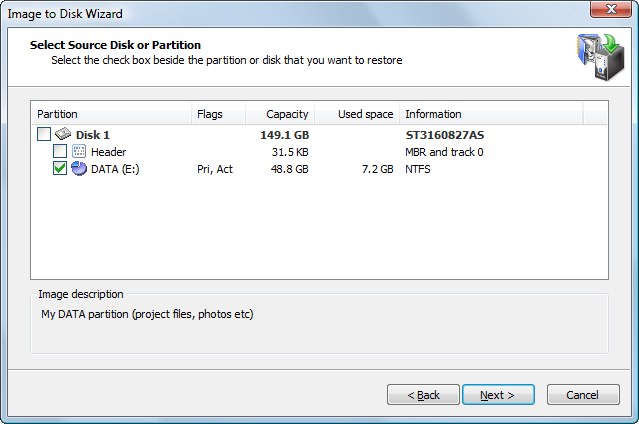
You may select only one check box. If you select a disk, all partitions belonging to the disk will be selected.
You can restore more than one disk (partition) in one operation. Once you have passed through all the wizard dialogs for the selected item, you will be prompted to add another disk (partition) to the restore operation.
When you select another disk or partition to restore, the partition previously selected for restoring will be represented by  icon. You may however select it again resulting in duplicating one partition in the backup into two on the target disk.
The process for restoring a disk is different from the process for restoring a partition.
When you restore a disk:
If you are restoring data from an image created on the same machine and it contains more than one disk, you may restore data in "Automated mode" by selecting two or more disks from the list.
In this case you won't be asked to select a destination disk but rather forwarded directly to the confirmation page. All the selected disks and the partitions they contain will be restored to their original location.
When you restore a partition:
When you create an image of a disk or a partition, the first track of each disk containing a MBR in sector 0 is stored in the backup.
Normally track 0 is filled with zeros except the first track which contains MBR (Master Boot Record) code and a partition table.
The MBR code is necessary to boot a system from the disk and must be present on the disk containing an active partition. When a new disk is added to the system Windows must initialize it before use (you can do it in Disk Manager). During disk initialization a typical MBR is written to the first sector.
Alternatively you may simply restore a partition to the new disk and Active@ Disk Image will also initialize it, so you should have no problems with booting from that disk.
However, if you use a non-standard boot manager it might use a proprietary MBR code and extra code or data in sector 1 and below. If you make a backup of such a disk and later restore it as a whole disk, the whole first track (normally 63 sectors) will be restored automatically, so the alternative boot manager data will be restored.
If you, however, decide to restore only a single partition to another (perhaps clean) disk, this proprietary MBR and data will be left behind. You have an option to restore the disk header (MBR and track 0) as a separate item when you are restoring that partition.
When restoring a disk header (MBR and track 0), only sectors belonging to the first track are overwritten. The partition table on the target disk is also preserved, so it is safe to restore a disk header to the disk containing data and you can do it even after restoring a partition.
If you are restoring a disk that has only one partition, keep in mind that the process of restoring a disk is different from the process of restoring a partition. If you select the partition in the image, you will proceed with partition recovery. If you select the disk, you will proceed with disk recovery.

