On this wizard page, select disks and partitions for back up. This list displays the disks installed in your system and the current partitions on them. If there are any dynamic volumes in the system, they will be shown in one group named Dynamic Volumes.
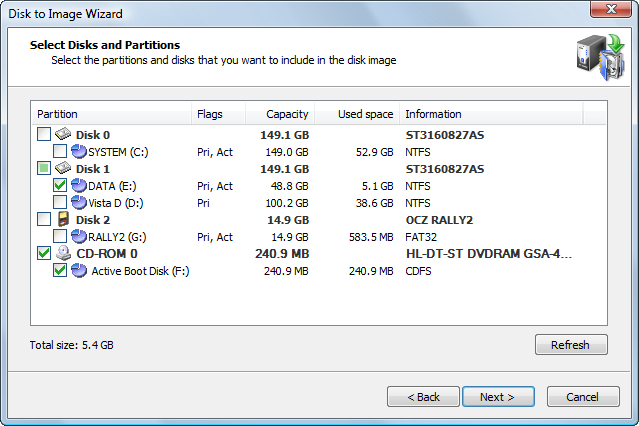
Information in this list is presented in five columns.
Select a check box next to a disk or partition if you want to include that disk or partition in the disk image. The check box for a disk item has three-states:
At the bottom of the list a total size for the selected partitions is displayed.
You can only select partitions formatted with a supported file system. Partitions with other file systems or unformatted partitions, cannot be selected and are shown without a check box. Partitions without a drive letter will display a number with a colon instead of the drive letter.
There are four types of devices supported, represented by different icons: hard drives, USB flash drives, floppy disks and CD/DVD drives. You may select partitions from all kinds of devices in one operation. However, only hard drives, USB flash and floppy partitions can be stored in one backup file. If you select a CD/DVD drive, an ISO image will be created for it and placed into separate subfolder.
If the image you are creating is an incremental or differential, you will see the list of selected partitions but wouldn't be able to change selection. This is because you select a set of partitions to backup when you create a first, full backup. For every subsequent backup you will only see the selection, but it is a read-only. You cannot change the set of partitions in incremental backup. You also need to have all partitions selected during the full backup available on your machine while making an incremental or differential backup.

